

 English
 Español
 Français
 Deutsch
 Italiano
 Português
 日本語
 Русский
 한국어
 简体中文
 繁體中文
 العربية
 Български
 Català
 Nederlands
 Ελληνικά
 हिन्दी
 Bahasa Indonesia
 Bahasa Melayu
 Polski
 Svenska
 ไทย
 Türkçe
 Українська
 Tiếng Việt
 Kiswahili
All tools › Optimize
Compress PDF Online for Free
Reduce a PDF for an email attachment or an upload limit. Choose a compression level or a 1 MB or 2 MB target, compare the preview and check the exact file size before downloading.
Basic compression is free without an account, a daily file quota or a PDFandGO watermark. Your PDF is processed in your browser on your device. Plans and pricing.
Compress a PDFNo document upload · keep your original PDFHow to reduce PDF file size
- Open your PDF in the compression tool.
- Choose Light to retain native page content, or Target size to try to fit an upload limit.
- Run compression. Check the exact byte count and zoom into small text in the before/after preview.
- Download the compressed copy when its size and quality meet your needs.
Compress a PDF to 1 MB or 2 MB
Select Target size, then 1 MB or 2 MB. Here, 1 MB means 1,000,000 bytes and 2 MB means 2,000,000 bytes. The result shows both a readable size and its exact byte count, so rounding does not hide whether it fits.
The target is a size limit, not a promised result. If your PDF is already below it, the tool returns the file without further compression. Otherwise it first tries to preserve PDF objects, then can turn pages into images if needed. A result can still exceed the target; check its status and the receiving service’s own rules.
For a smaller file when the original already fits, try Light or compare another compression level. Different targets can produce the same output. Read the 1 MB and 2 MB compression guide for downloadable examples.
Choose a mode for your document
| Mode | What changes | When to try it |
|---|---|---|
| Light | Re-saves PDF objects. Native text, links and form fields are retained. | Text documents and fillable forms; savings can be small. |
| Recommended | Renders every page as a compressed image. Text selection, links and interactive fields are lost. | Scans and image-heavy files when the preview remains readable. |
| Strong | Uses lower-resolution page images for greater size reduction, with more visible quality loss. | A tighter limit when the result is still suitable for its intended use. |
| Target size | Leaves an already-small file unchanged; otherwise tries object compression before page images. | A specific upload limit, with a final size and quality check. |
“Without losing quality” depends on the file and the mode. Light avoids rasterizing native pages, but may not make a file smaller. Image-based modes trade detail and interactive content for size. Always keep the source PDF.
A real 1 MB target example
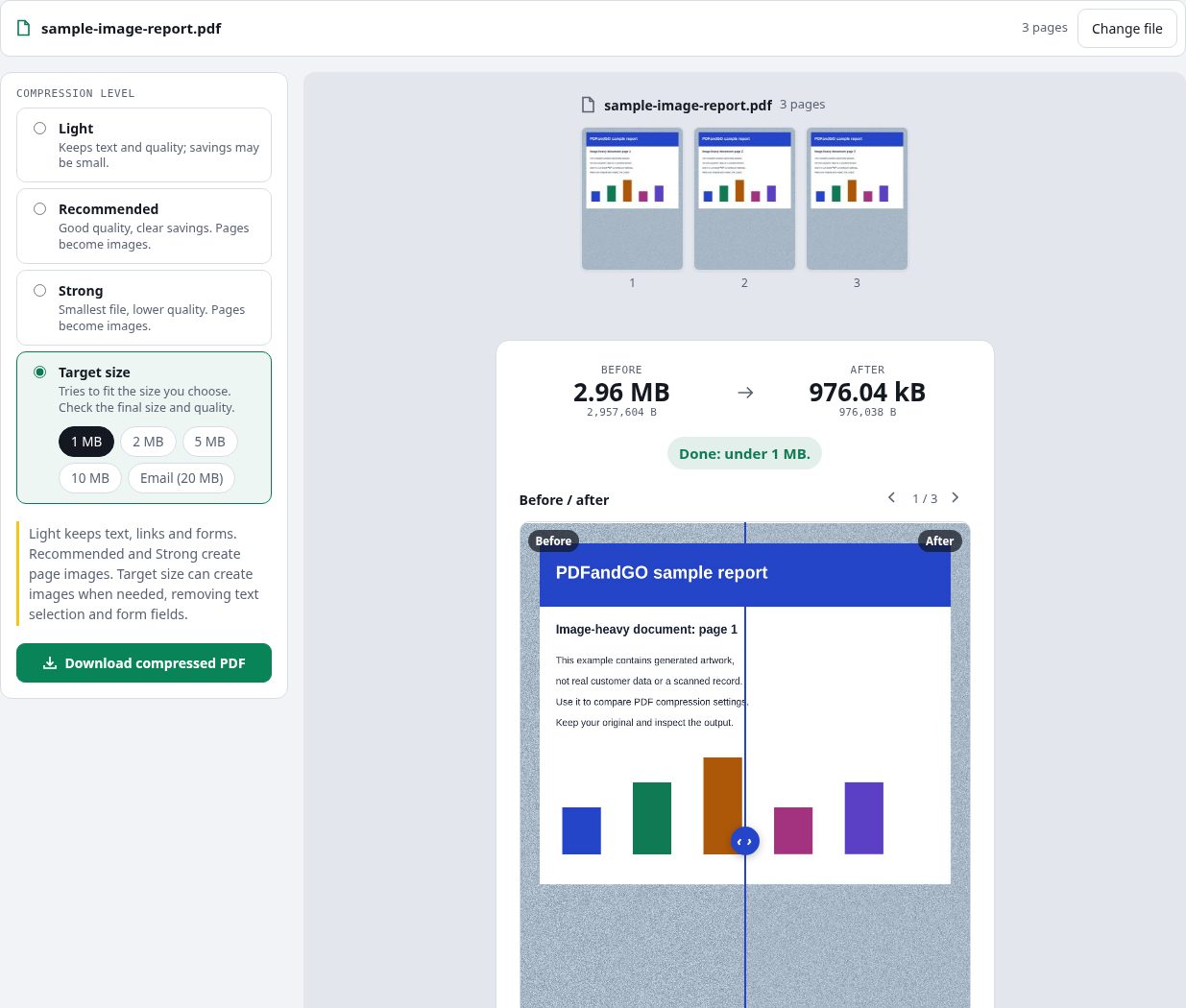
Our generated three-page image report went from 2,957,604 bytes to 976,038 bytes with the 1 MB target. It retained all three pages. This is one measured example, not a compression rate promised for your document.
Why a PDF may not get smaller
A PDF containing mostly text or already compressed pictures may have little left to reduce. Rasterizing a small native-text page can even make it larger. For Light, Recommended and Strong, the tool offers a download only when the result is at least 2% smaller. Target size also lets you save an unchanged or over-limit result; read the status first.
If the file cannot meet your limit at usable quality, remove unnecessary pages with Organize PDF or use Split PDF when the receiving service accepts separate files. Start again from the original when comparing settings.
Questions and answers
Can I compress a PDF to 1 MB for free?
Yes. The target-size option is part of the free basic compression tool, with no account, daily file quota or PDFandGO watermark. Whether your file can reach 1 MB at usable quality depends on the document. Other advanced operations have separate access rules.
What does the 1 MB target mean?
The 1 MB target is 1,000,000 bytes; 2 MB is 2,000,000 bytes. Check the exact byte count in the result and the receiving service’s upload rules. A rounded size alone can hide whether a file is over the limit.
Can I keep selectable text and fillable forms?
Choose Light to retain native text, links and form fields. Recommended and Strong turn pages into images and remove those features. Target size leaves an already-small PDF unchanged and tries object compression first, but can use page images when needed. Check the exported document.
Why did Target size return the same file?
If the current PDF is already below the selected limit, Target size returns it unchanged. It aims to fit a cap rather than find the smallest possible file. Try Light or compare another compression level if you need further reduction.
Can every PDF be compressed without losing quality?
No. Light avoids converting native pages to images, but an already optimized file may not shrink. Image-based modes can reduce detail and remove selectable text, links and interactive form fields. Compare the result at a readable zoom before downloading.
Are my document files uploaded?
No. PDF processing runs in your browser on your own device. Software, fonts or language models may download when needed. Account, payment and technical data are handled separately as explained in the privacy policy.
Can I compress a PDF on my phone?
Use a supported modern browser on your phone, tablet or computer. Preview the output before saving. Large or complex documents depend on your device memory and may take longer.