

 English
 Español
 Français
 Deutsch
 Italiano
 Português
 日本語
 Русский
 한국어
 简体中文
 繁體中文
 العربية
 Български
 Català
 Nederlands
 Ελληνικά
 हिन्दी
 Bahasa Indonesia
 Bahasa Melayu
 Polski
 Svenska
 ไทย
 Türkçe
 Українська
 Tiếng Việt
 Kiswahili
All tools › Convert
Convert PDF Pages to JPG or PNG
Save PDF pages as JPG or PNG images for a presentation, a preview or sharing. Choose the output settings and convert the pages on your own device.
Basic use is free without an account, a daily file quota or a PDFandGO watermark. OCR, existing-text replacement and Word export are separate advanced operations; using them on the document can change its download-access requirements. Current allowances and Pro plans.
Convert PDF to ImagesDocument processing on your device · works in your browserHow to convert PDF to JPG
- Open the PDF you want to turn into images.
- Choose JPG or PNG and the available quality settings.
- Download the images. Multiple pages are packaged together as a ZIP.
Choose JPG or PNG for your result
JPG is often useful for a compact preview or a page containing photographs. PNG can be useful for text, diagrams and sharp edges, but the files may be larger.
Review the result at the size where it will be used. A higher-resolution export can require more memory, especially for long documents.
Export complete PDF pages
This tool renders each page as an image. It is useful for showing a document page in a slide or sending a visual preview.
A page image does not keep searchable PDF text, clickable links or interactive form fields. This is also different from extracting the original image files embedded inside a PDF. Keep the original document when those features matter.
Try the tool with sample files
Samples contain generated demonstration content, not real customer data. Keep the source when comparing settings. An example result does not guarantee the same behavior for every PDF.
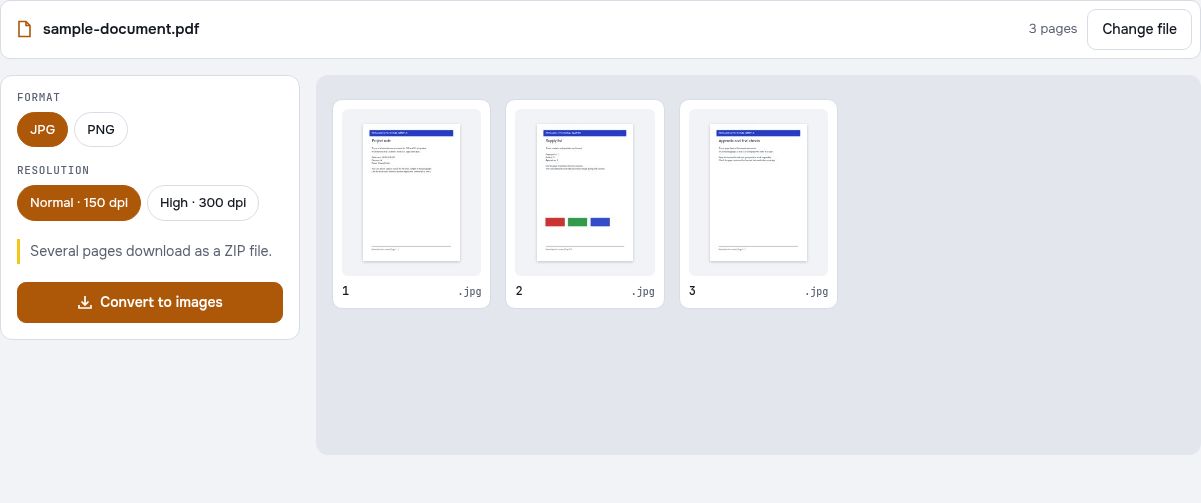
Export a three-page sample and count the image files
Choose the fictional three-page report to practice converting complete PDF pages to pictures. Select the output format and the pages you want. Exporting pages is different from extracting only the photographs embedded inside them.
Choose a format for the next step
JPG is often suitable for a compact page preview, while PNG can be useful for sharper text or line art. Compare an actual exported page at the size it will be used. Higher resolution can improve detail but also increases the memory and storage needed.
Check the result as a sequence
If you export all three pages, look for three page images in the downloaded result or archive. Open the first and last images and inspect the supply-list page between them. Use file names and visible headings to confirm the order rather than relying only on an archive preview.
Check your result
- Confirm the selected page range before export.
- Count the resulting images against the selected pages.
- Inspect small text and page edges at the intended viewing size.
Try it with fictional sample files
These are synthetic practice inputs, not customer documents or promised outputs. Keep the originals and inspect your own exported copies. Current allowances and Pro plans apply to advanced downloads.
Continue with these tools:
Questions and answers
Can I convert a PDF to PNG?
Yes. Choose PNG instead of JPG in the image export settings and review the result before saving.
How do I download several pages?
Each exported page becomes an image. When there are multiple images, they are downloaded together as a ZIP file.
Does the image keep editable text and form fields?
No. JPG and PNG are pictures of the rendered page. Keep the PDF or use an appropriate text conversion tool if you need editable or searchable content.
Are my document files uploaded?
No. PDF processing runs in your browser on your own device. Software, fonts or language models may download when needed. Account, payment and technical data are handled separately as explained in the privacy policy.
Does it work on a phone?
Use a supported modern browser on your phone, tablet or computer. Large or complex documents depend on your device memory and may take longer.
Is it free?
Basic use is free without an account, a daily file quota or a PDFandGO watermark. OCR, existing-text replacement and Word export are separate advanced operations; using them on the document can change its download-access requirements. Current allowances and Pro plans.
How many pictures should the three-page sample produce?
Selecting all three pages should produce one page image for each selected page. Check for three images in the result or archive. Selecting a smaller page range changes the expected count.