

 English
 Español
 Français
 Deutsch
 Italiano
 Português
 日本語
 Русский
 한국어
 简体中文
 繁體中文
 العربية
 Български
 Català
 Nederlands
 Ελληνικά
 हिन्दी
 Bahasa Indonesia
 Bahasa Melayu
 Polski
 Svenska
 ไทย
 Türkçe
 Українська
 Tiếng Việt
 Kiswahili
All tools › Security
Password Protect a PDF Online for Free
Create a PDF that asks for a password when opened. Choose the opening password, set the available printing, copying and editing preferences, then download the encrypted copy. Basic PDF protection is free without an account.
Basic use is free without an account, a daily file quota or a PDFandGO watermark. OCR, existing-text replacement and Word export are separate advanced operations; using them on the document can change its download-access requirements. Current allowances and Pro plans.
Protect a PDFDocument processing on your device · works in your browserHow to add a password to a PDF
- Choose a PDF you can open and are authorized to protect.
- Enter your chosen password twice. Keep a record of it separately from the file.
- Review the printing, text-copying and editing preferences, then choose Protect and download.
- Reopen the saved file in a PDF reader and check that it asks for your password. Keep the original if you need an unprotected copy.
An opening password with AES-256 encryption
The opening password is used to encrypt the saved PDF with AES-256. The recipient needs the password to open the protected copy in a compatible reader.
PDFandGO processes the document and password in your browser. The download does not send the file or its password to a recipient. Share the protected document and its password using the method you choose.
Printing, copying and editing preferences
The available controls set PDF permission preferences in the output. For example, you can leave printing allowed while clearing the copy and edit options.
Permission handling varies between PDF readers. These preferences are not a guarantee that someone who can open and view a document can never reproduce its visible content. They are separate from the encryption that requires an opening password.
Password protection, redaction or metadata removal?
Password protection restricts opening the protected copy. It does not remove sensitive words, images or document information from the original file.
Use Redact PDF when selected content should be permanently removed from a distributed copy. Use the privacy tool to inspect supported hidden document information. Choose the operation that matches what you want the recipient to receive.
Keep the password and test your copy
PDFandGO does not provide password recovery for the encrypted output. Save the password securely and reopen the downloaded file to check it before sharing.
To remove the password later, open the document using its password and use Unlock PDF. This is different from recovering a password you do not know. Basic protection adds no PDFandGO watermark; other advanced operations have their own access rules.
Try the example and inspect the output
We protected our three-page sample with an opening password. The exported document uses AES-256 encryption, rejects an incorrect password and opens with the public demo password below. Printing is allowed; the copy and edit permission preferences are cleared.
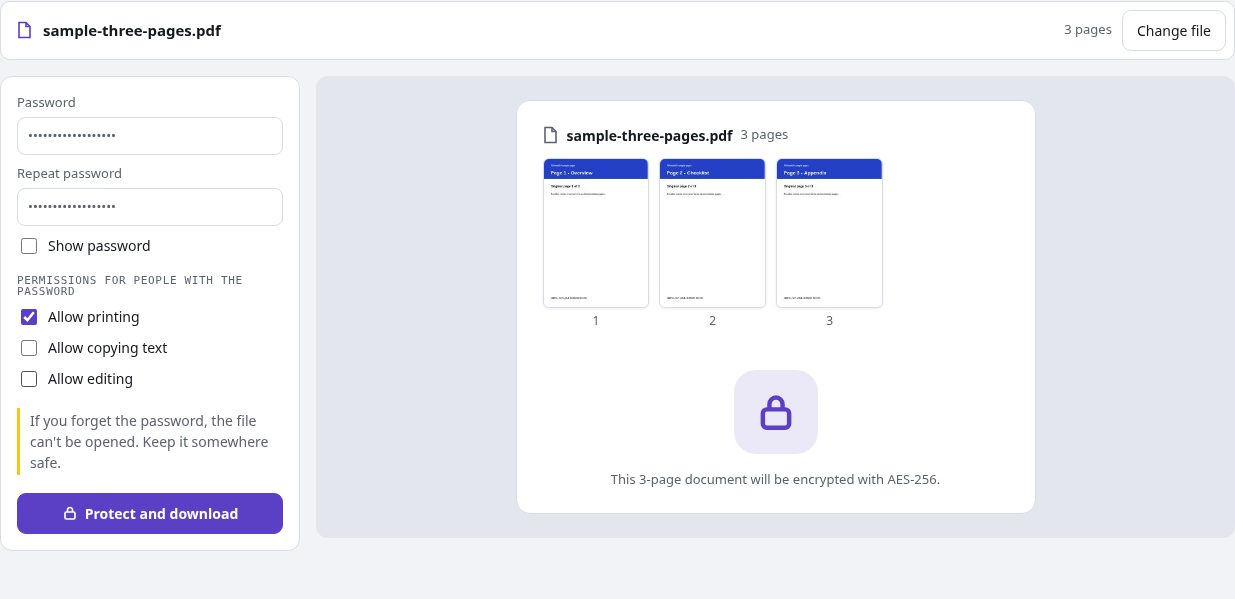
These permission flags are reader preferences, separate from the opening-password encryption. This is a public demonstration document containing no confidential information.
Public sample password: PDFandGO-demo-2026. Choose your own password for your documents.
Questions and answers
Does the protected PDF ask for a password to open?
Yes. The output uses an opening password with AES-256 encryption. Reopen the downloaded file in a compatible reader and confirm that your chosen password works.
Will copy and edit restrictions work in every reader?
PDF viewers handle permission preferences differently. The settings are separate from the opening password and do not guarantee that visible content can never be reproduced.
Can PDFandGO recover a forgotten password?
No. Keep a record of the password and an original copy when appropriate. Unlock PDF requires a password that can open the file.
Does adding a password remove sensitive information?
No. Encryption controls opening the protected copy; it is not redaction. Remove content or inspect document information with the appropriate tool before distributing the copy.
Are my document files uploaded?
No. PDF processing runs in your browser on your own device. Software, fonts or language models may download when needed. Account, payment and technical data are handled separately as explained in the privacy policy.
Does it work on a phone?
Use a supported modern browser on your phone, tablet or computer. Large or complex documents depend on your device memory and may take longer.
Is it free?
Basic use is free without an account, a daily file quota or a PDFandGO watermark. OCR, existing-text replacement and Word export are separate advanced operations; using them on the document can change its download-access requirements. Current allowances and Pro plans.