

 English
 Español
 Français
 Deutsch
 Italiano
 Português
 日本語
 Русский
 한국어
 简体中文
 繁體中文
 العربية
 Български
 Català
 Nederlands
 Ελληνικά
 हिन्दी
 Bahasa Indonesia
 Bahasa Melayu
 Polski
 Svenska
 ไทย
 Türkçe
 Українська
 Tiếng Việt
 Kiswahili
All PDF tools › Read, listen and summarize
Summarize a PDF with key sentences
Find selected sentences and keywords to help you start reading a longer PDF. Choose a summary length and use the page references to check each selection in context.
Open the toolPDF processing on your device · keep your originalBasic use is free without an account, a daily file quota or a PDFandGO watermark. OCR, existing-text replacement and Word export are separate advanced operations; using them on the document can change its download-access requirements. Current allowances and Pro plans.
How to summarize a PDF
- Open a PDF with readable text; use OCR first if it is only a scan.
- Choose Short, Medium or Long and review the selected sentences and page references.
- Compare important points with the original, then copy the summary or download a TXT file.
Sentence selection rather than generated prose
This is an extractive summarizer: it selects existing sentences instead of writing new ones with a generative chat model. Keywords offer another entry point into the document. A selected sentence is not automatically the most important statement, and a short document may produce little or no reduction.
Check the surrounding context
A sentence can lose qualifications or supporting information when read alone. Use its page reference to return to the source. The summary is a reading aid, not a complete assessment of the PDF, and it can omit points that matter for your particular task.
Scans, tables and text quality
A PDF without usable text needs OCR first. Recognition errors, complex reading order and table-heavy pages can reduce the usefulness of sentence selection. Review the extracted text and keep the source document. Basic summarizing is free; adding OCR uses its own advanced access rules.
Try the tool with sample files
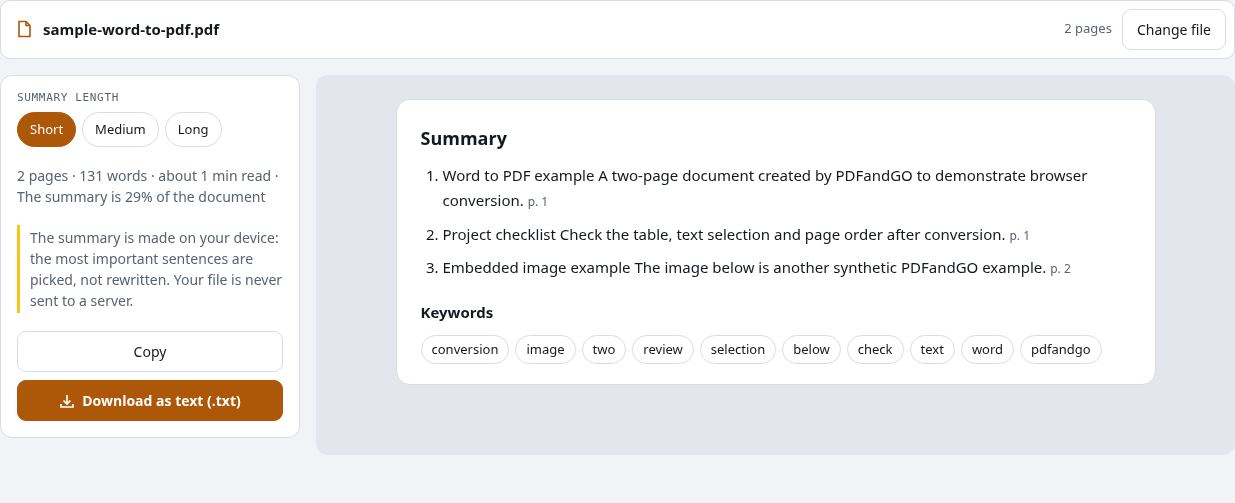
Samples contain generated demonstration content, not real customer data. Keep the source when comparing settings. An example result does not guarantee the same behavior for every PDF.
Questions and answers
Is this a generative AI PDF summarizer?
No. It selects sentences from extracted PDF text; it does not generate a new explanation or provide a chat with the document.
Can it summarize scanned pages?
Use OCR to recognize their text first if needed, check the recognition, then reopen the summary tool.
Can I download a summary as PDF or audio?
This tool offers copying and TXT download. It does not provide a summary-PDF or audio-file export.
Why is my summary almost as long as the source?
A short document may have too few sentences to reduce substantially. Summary length and the available extracted text affect the result.
Are my document files uploaded?
PDF processing runs in your browser on your own device. Document files are not uploaded to a PDF-processing server. Software, fonts or language models may download when needed. Account, payment and technical data are handled separately under the privacy policy.
What are the access and download rules?
Basic use is free without an account, a daily file quota or a PDFandGO watermark. OCR, existing-text replacement and Word export are separate advanced operations; using them on the document can change its download-access requirements.