

 English
 Español
 Français
 Deutsch
 Italiano
 Português
 日本語
 Русский
 한국어
 简体中文
 繁體中文
 العربية
 Български
 Català
 Nederlands
 Ελληνικά
 हिन्दी
 Bahasa Indonesia
 Bahasa Melayu
 Polski
 Svenska
 ไทย
 Türkçe
 Українська
 Tiếng Việt
 Kiswahili
All PDF tools › Convert, scan and recognize text
Translate the text in a PDF
Translate PDF text into English or another available target language. Supported pairs and output formats depend on the translation engine and device; review the result before relying on it.
Open the toolPDF processing on your device · keep your originalAdvanced downloads use the daily file allowance shown in the tool. Guest and free-member allowances differ. Pro removes the daily file quota and renews monthly or yearly. Current allowances and Pro plans.
How to translate PDF text
- Open the PDF and select the source and target languages.
- Allow required model downloads and start translation when the chosen pair is available.
- Check the wording and layout, then use available advanced access to save the offered PDF or Word output.
Language support is not the interface-language list
The site’s interface languages do not guarantee that every translation pair is available. The tool uses supported on-device engines, which may require model downloads. Browser capabilities and available language models affect what can run; read an unsupported-pair message rather than assuming another device will behave identically.
Longer translations can change the page layout
Translated text may be longer than the original and may not fit a small label, table cell or column. Check overlaps, fonts and page breaks. Some target scripts use Word output when the same-layout PDF path is not supported. Scanned pages may need OCR before their words can be translated.
Review the meaning as well as the formatting
Automatic translation can misread terminology, names or context. Use the source alongside the output and have important wording checked appropriately. The tool is not a certified translation service. Translating a document’s language is also different from converting PDF to Word or another file format.
Try the tool with sample files
Samples contain generated demonstration content, not real customer data. Keep the source when comparing settings. An example result does not guarantee the same behavior for every PDF.
Try one short document before translating a longer report
The fictional sample contains short English paragraphs, a reference number and a small quantity list. Use it to test a supported language pair before committing time to a longer document. The screenshot shows preparation controls, not a completed translation.
Check names, numbers and the direction of translation
Select the actual source language and a supported target language. In the result, compare the reference DEMO-EN-001, the quantities and the page headings against the original. A fluent sentence can still contain an incorrect name or number.
Inspect the space needed by the translated text
Some target languages need longer phrases or a different writing direction. Review line breaks, lists and text close to page edges. Available output formats vary by translation engine. Check the translated text and page layout before using the result.
Check your result
- Confirm that the selected language pair is available.
- Compare reference codes and quantities with the source.
- Review meaning and page layout before sharing a result.
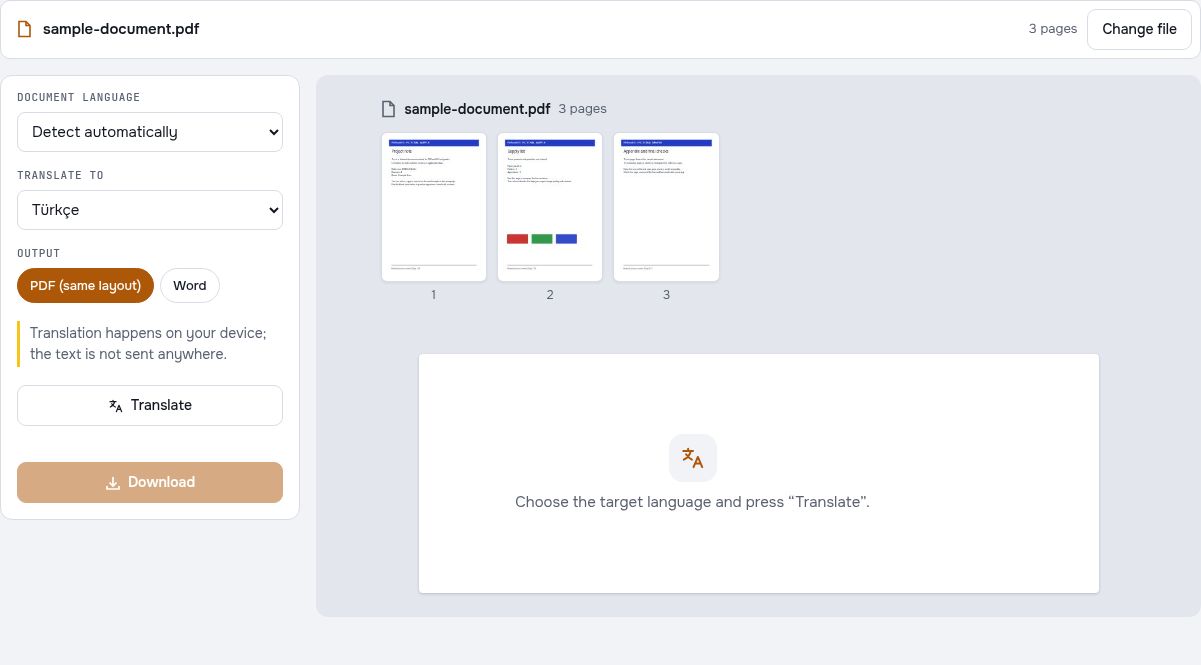
Try it with fictional sample files
These are synthetic practice inputs, not customer documents or promised outputs. Keep the originals and inspect your own exported copies. Current allowances and Pro plans apply to advanced downloads.
Continue with these tools:
Questions and answers
Can I translate every PDF into English?
You need readable text, a supported language pair and a suitable device or browser. Scans may need OCR before translation.
Will the layout stay identical?
No exact-layout guarantee is made. Longer sentences, tables and complex pages can require adjustments.
Why is Word offered instead of PDF?
Some target scripts are not supported by the same-layout PDF output path, so Word output can be used instead.
Is the document sent to a translation service?
The tool is designed around on-device translation engines. Required model files may download, while document processing runs on the device.
Are my document files uploaded?
PDF processing runs in your browser on your own device. Document files are not uploaded to a PDF-processing server. Software, fonts or language models may download when needed. Account, payment and technical data are handled separately under the privacy policy.
What are the access and download rules?
Advanced downloads use the daily file allowance shown in the tool. Guest and free-member allowances differ. Pro removes the daily file quota and renews monthly or yearly.
Can I practice with a short sample before translating a whole report?
Yes. Use the fictional English sample with a language pair supported by the tool and browser. Check its headings, reference code and quantities in the result. Model downloads, language support and advanced-download allowances may affect the workflow.