

 English
 Español
 Français
 Deutsch
 Italiano
 Português
 日本語
 Русский
 한국어
 简体中文
 繁體中文
 العربية
 Български
 Català
 Nederlands
 Ελληνικά
 हिन्दी
 Bahasa Indonesia
 Bahasa Melayu
 Polski
 Svenska
 ไทย
 Türkçe
 Українська
 Tiếng Việt
 Kiswahili
All tools › Edit and sign
Free Online PDF Editor
Add text, pictures, shapes or a signature to a PDF in your browser. You can also change existing text and work with scanned pages using OCR, with advanced downloads covered by daily allowances or Pro.
Adding new text, images and shapes is basic use. Existing-text replacement, OCR and Word export use advanced-download access. Check the daily file allowance shown in the tool. Guest and free-member allowances differ; Pro removes the daily file quota. Current allowances and Pro plans.
Open PDF EditorDocument processing on your device · works in your browserSee the tool in use
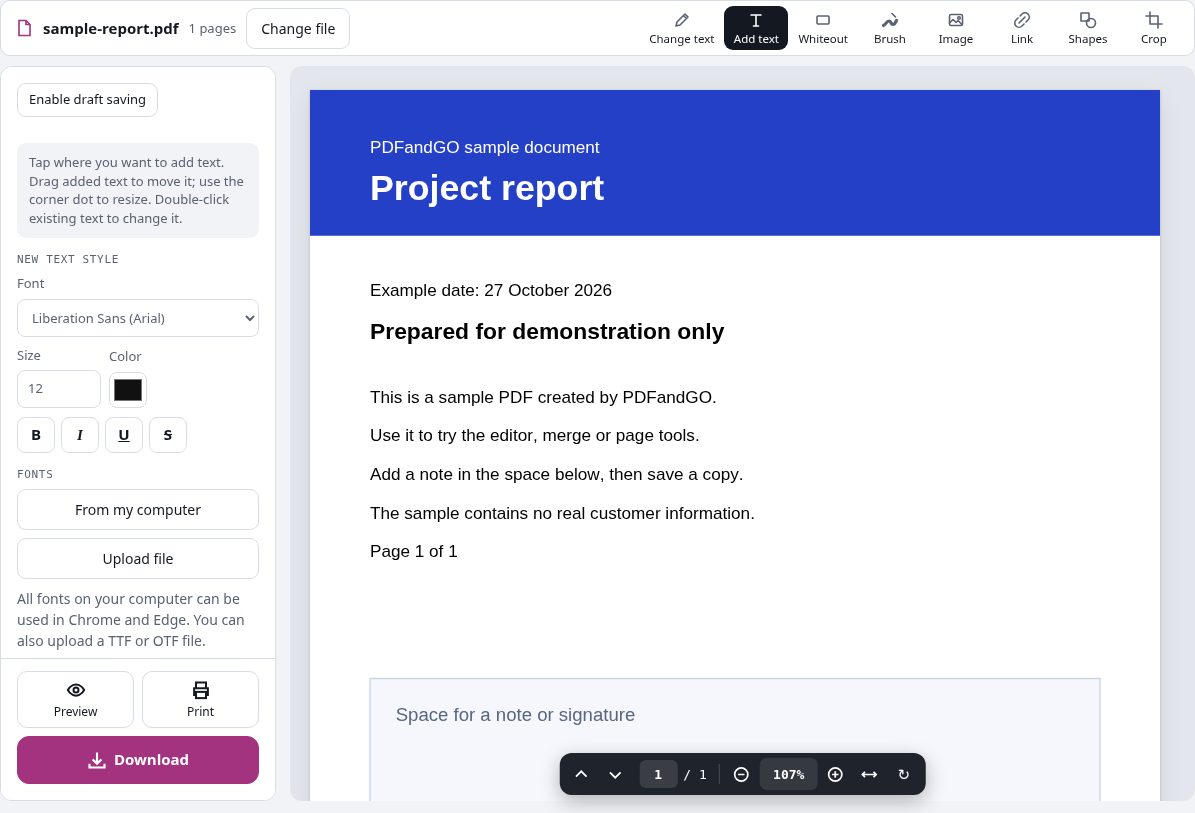
Related guide (English): Add Text to a PDF vs Edit Existing Text
How to edit a PDF online
- Open the editor and choose a PDF from your device.
- Use the editing tools to add text, images or a signature. To change existing wording, select the text you want to replace.
- Review the pages and save an edited copy. If the document uses an advanced feature, review the available daily allowance or Pro option before downloading.
Add new text or change existing text
Adding a text box is useful for a date, a note or a form that has no editable fields. It places new content on the page. Changing existing wording is a different operation: select the original text and enter a replacement.
PDFandGO tries to match the original font and appearance. A font may not contain every character, and a longer replacement may need layout adjustments. Check the preview before saving. Existing-text changes are an advanced feature.
Edit a scanned PDF with OCR
A scanned page is an image rather than selectable text. Run OCR in the document language first, then review the recognized words before changing or exporting them. Blurred scans and handwriting can reduce accuracy.
For filling in a flat form, you can often add text or a signature without recognizing the entire page. Choose the operation that matches the result you need.
Questions and answers
Can I change text in a scanned PDF?
A scanned page needs OCR before its words can be recognized. Choose the document language, review the recognized text and then edit it. OCR and existing-text changes use advanced download allowances.
Is adding text the same as editing the original text?
No. A text box adds content over a page. Existing-text editing replaces selected wording and uses advanced download allowances. Review the result when the font or text length changes.
Can I fill in a PDF form?
Use Fill PDF forms for existing interactive fields. For a flat form with no fields, place new text or a signature where needed. You do not need to recognize an entire scanned page just to add text over it.
Are my document files uploaded?
No. PDF processing runs in your browser on your own device. Software, fonts or language models may download when needed. Account, payment and technical data are handled separately as explained in the privacy policy.
Does it work on a phone?
Use a supported modern browser on your phone, tablet or computer. Large or complex documents depend on your device memory and may take longer.
Is it free?
Adding new text, images and shapes is basic use. Existing-text replacement, OCR and Word export use advanced-download access. Check the daily file allowance shown in the tool. Guest and free-member allowances differ; Pro removes the daily file quota. Current allowances and Pro plans.
Continue with another PDF tool
Annotate a PDF with notes and highlights
Add notes, highlights, arrows and drawings to a PDF on your device. Review visible marks before saving; annotations do not erase underlying text.
PDF to Excel / CSV
Extract tables from the current document, including your edits. Review detected cells before downloading. Scanned pages need OCR first.
PDF to PowerPoint
Each selected PDF page becomes an image on a PowerPoint slide. The page appearance is preserved; text inside the page image is not individually editable.