

 English
 Español
 Français
 Deutsch
 Italiano
 Português
 日本語
 Русский
 한국어
 简体中文
 繁體中文
 العربية
 Български
 Català
 Nederlands
 Ελληνικά
 हिन्दी
 Bahasa Indonesia
 Bahasa Melayu
 Polski
 Svenska
 ไทย
 Türkçe
 Українська
 Tiếng Việt
 Kiswahili
All PDF tools › Edit, sign and prepare forms
Create a fillable PDF form
Design a PDF that other people can fill in on screen. Try finding empty areas automatically, or place and name the form fields yourself.
Open the toolPDF processing on your device · keep your originalAdvanced downloads use the daily file allowance shown in the tool. Guest and free-member allowances differ. Pro removes the daily file quota and renews monthly or yearly. Current allowances and Pro plans.
How to create a fillable PDF form
- Open the PDF that should become a form.
- Try automatic field detection or place the required text fields and other supported controls manually.
- Review field names, positions and settings, then download with available advanced access and test the form.
Creating a form versus filling one
The form creator adds interactive controls for future entries. If you only need to type your own answers into an existing form, use Fill PDF forms instead. A background line or a blank table cell is not automatically an interactive PDF field.
Automatic detection needs review
The tool looks for patterns such as empty lines and boxes, but it cannot guarantee that every intended field is detected correctly. Delete false matches, add missing fields, check their names and adjust their bounds. Nearby text may help name a field but is not always a suitable final label.
Test the form in its intended reader
PDF readers support form controls differently, especially buttons, image or signature-related fields and advanced actions. Fill and save a test copy in the reader the recipient will use. A field that accepts a signature mark is not a service that issues or validates a digital signing certificate.
Try the tool with sample files
Samples contain generated demonstration content, not real customer data. Keep the source when comparing settings. An example result does not guarantee the same behavior for every PDF.
Turn a flat sample page into a small fillable form
Start with the first page of the fictional sample and add only a name field and a confirmation checkbox. A short form is easier to test than a full application containing many fields and calculations.
Place fields where a reader will expect them
Keep text fields inside the available writing area and put checkboxes next to their labels. Give separate fields distinct names so that unrelated answers are not unintentionally linked in a PDF reader. Automatic suggestions, if available, still need a manual placement check.
Test the exported form rather than only its appearance
Open the saved PDF in the reader your recipients are likely to use. Type a fictional name, change the checkbox, save and reopen it. Confirm that the values remain editable. A page that looks like a form is not proof that the exported file contains interactive fields.
Check your result
- Check field names, positions and the order of the labels.
- Enter fictional answers in the exported PDF.
- Reopen the saved form and confirm that the answers remain.
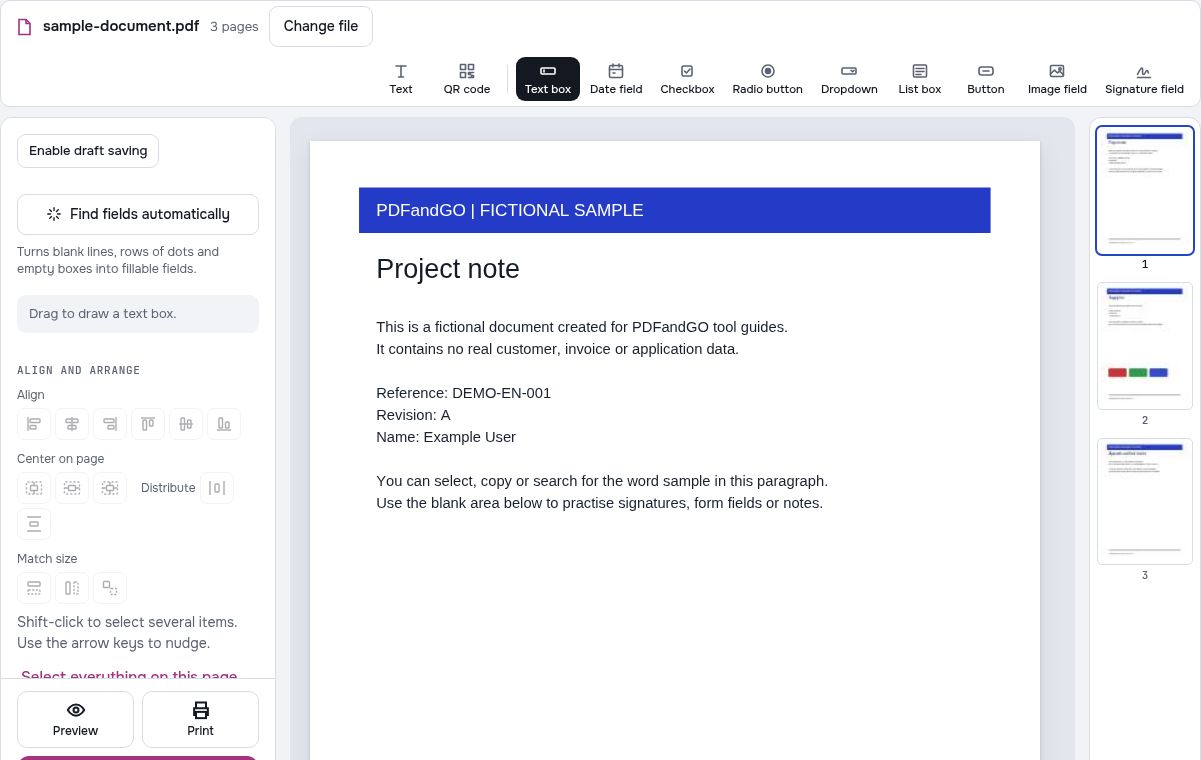
Try it with fictional sample files
These are synthetic practice inputs, not customer documents or promised outputs. Keep the originals and inspect your own exported copies. Current allowances and Pro plans apply to advanced downloads.
Continue with these tools:
Questions and answers
Can every PDF become a form automatically?
Not reliably. Detection depends on page structure and image quality. Review the proposed fields and complete the design manually where needed.
Can I rename or move detected fields?
Yes. Edit the supported field properties, adjust the position and size, or remove an unwanted field.
Will the form work identically in every PDF reader?
No. Test the controls in the intended reader, particularly special field types and actions.
Is creating a form the same as filling it?
No. Creating adds interactive fields; filling enters values or visible text. Form creation is an advanced feature with its own download rules.
Are my document files uploaded?
PDF processing runs in your browser on your own device. Document files are not uploaded to a PDF-processing server. Software, fonts or language models may download when needed. Account, payment and technical data are handled separately under the privacy policy.
What are the access and download rules?
Advanced downloads use the daily file allowance shown in the tool. Guest and free-member allowances differ. Pro removes the daily file quota and renews monthly or yearly.
Can I use the sample to practice creating fillable fields?
Yes. The downloadable text PDF is a flat practice document. Add a few fields, export a copy under the applicable advanced-download allowance, and test entering and saving answers in the intended PDF reader.