

 English
 Español
 Français
 Deutsch
 Italiano
 Português
 日本語
 Русский
 한국어
 简体中文
 繁體中文
 العربية
 Български
 Català
 Nederlands
 Ελληνικά
 हिन्दी
 Bahasa Indonesia
 Bahasa Melayu
 Polski
 Svenska
 ไทย
 Türkçe
 Українська
 Tiếng Việt
 Kiswahili
All PDF tools › Edit, sign and prepare forms
Add a watermark or stamp to a PDF
Label a draft, place a logo or add a visible document stamp. Choose the available text or image option and check that the result leaves the document readable.
Open the toolPDF processing on your device · keep your originalBasic use is free without an account, a daily file quota or a PDFandGO watermark. OCR, existing-text replacement and Word export are separate advanced operations; using them on the document can change its download-access requirements. Current allowances and Pro plans.
How to watermark a PDF
- Open the PDF and choose a text watermark, stamp or supported image.
- Adjust placement and size; use the text-watermark color, angle and opacity settings where needed.
- Review the pages and save a marked PDF copy.
A watermark and a placed stamp
A watermark can identify a draft across the page, while a stamp can mark a particular location. Text such as DRAFT or a logo can communicate a document’s status. Keep enough contrast for the mark without hiding the page content.
Appearance depends on the source image
A small or blurry logo can look poor when enlarged. Check any background around an image and make sure it does not obscure nearby writing. Text-watermark controls provide their own appearance settings; do not assume every image stamp has the same controls.
A visible mark is not an access restriction
A watermark does not guarantee that someone cannot copy, edit or reproduce a document. For an opening password, use the protection tool. For content removal, use redaction. Dedicated page numbering is available when a consistent sequence is the main task.
Try the tool with sample files
Samples contain generated demonstration content, not real customer data. Keep the source when comparing settings. An example result does not guarantee the same behavior for every PDF.
Check a visible draft mark across different page backgrounds
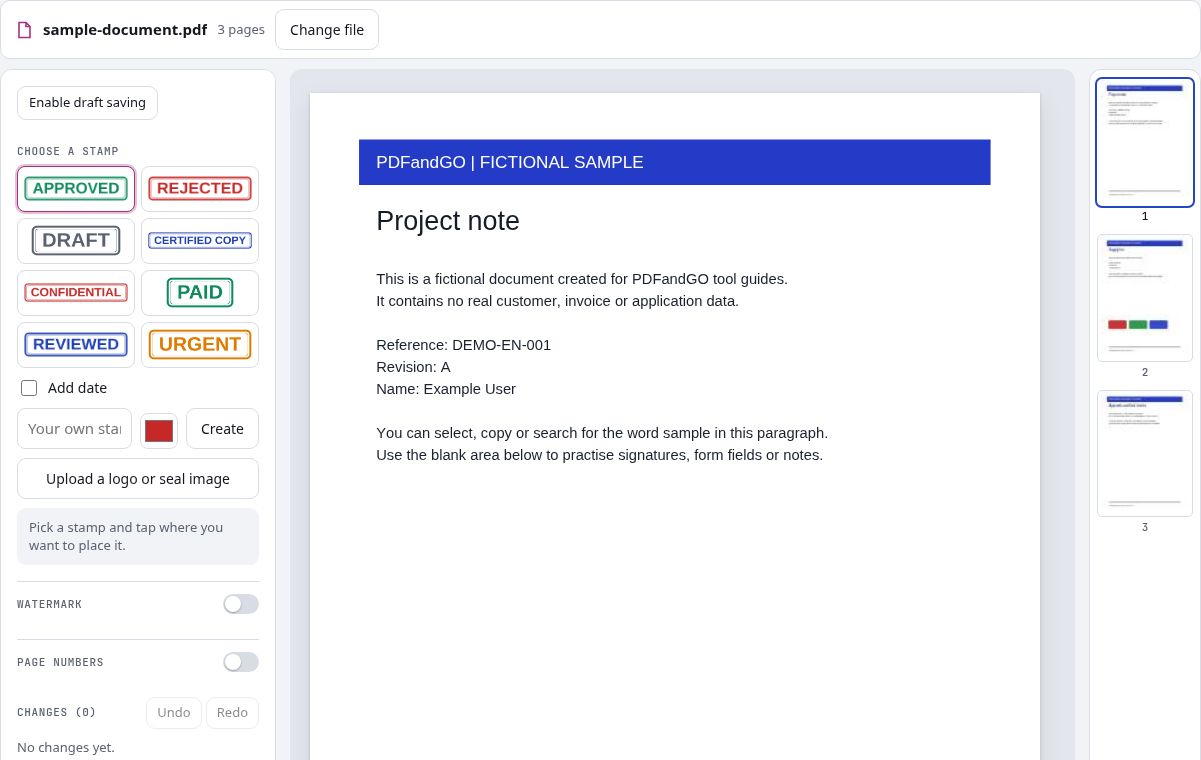
Try a DRAFT watermark or a single placed stamp on the fictional three-page report. Its text areas and colored bands let you inspect whether the mark remains visible without making the document difficult to read.
Choose the extent of the mark deliberately
A watermark can cover a broad area or repeat across pages; a stamp is placed at a specific position. Preview the selected pages and make sure you have chosen the intended mode. A small stamp in one location should not be mistaken for a mark covering the whole document.
Balance contrast and readability
Review dark text, white margins and the colored bands at a normal zoom level. If a mark covers essential content, adjust its size, position or supported appearance settings. Save a copy and inspect the exported pages, because an on-screen preview is only one stage of the check.
Check your result
- Inspect both a mostly white page and the colored supply-list page.
- Check that the chosen page range received the mark.
- Keep body text and important numbers readable.
Try it with fictional sample files
These are synthetic practice inputs, not customer documents or promised outputs. Keep the originals and inspect your own exported copies. Current allowances and Pro plans apply to advanced downloads.
Continue with these tools:
Questions and answers
Can I use my own logo?
Yes. Use the supported image option and check its edges, background and size in the preview.
Can I change a text watermark’s opacity?
Yes. Text-watermark controls include opacity, color, size and angle options.
Does a watermark prevent copying?
No. It is a visible mark, not an absolute copy or edit restriction.
Can I add page numbers instead?
Use the dedicated page-numbering tool to choose a number format, position and starting value.
Are my document files uploaded?
PDF processing runs in your browser on your own device. Document files are not uploaded to a PDF-processing server. Software, fonts or language models may download when needed. Account, payment and technical data are handled separately under the privacy policy.
What are the access and download rules?
Basic use is free without an account, a daily file quota or a PDFandGO watermark. OCR, existing-text replacement and Word export are separate advanced operations; using them on the document can change its download-access requirements.
How do I check a watermark on light and dark page areas?
Use the text and colored areas in the sample PDF. Review the mark on each background, adjust the supported appearance and placement controls, then inspect the downloaded copy. A visible watermark does not prevent copying or editing.
Continue with another PDF tool
Send a stamp from your phone
Scan this QR code with your phone. Choose or photograph your stamp, then tap Send. Keep this window open.
Choose a stamp photo, review it, then send it to your computer.
The PDF stays on your computer. Only the image is transferred directly. The link lasts 10 minutes and accepts one image.